Running bulk edits safely: an operating playbook
A tool can refuse to write without a preview. It can't make you read one. These are the habits that decide whether a bulk edit is boring — which is the only thing you actually want a bulk edit to be.
Gridproof's safety features are structural: the preview happens whether you want it or not, the checkpoint is taken before anything is computed, and verification runs on every job. What's left is the part no software can do for you — aiming correctly, reading what you're shown, and not panicking afterwards.
Everything below is written for Gridproof, but most of it survives a change of tool.
1. Rehearse on a slice
Before a catalog-wide change, run the same change against a handful of products — narrow the filter with "title contains" or a tag until the preview shows three or four rows, then take it all the way through execution and read the receipt.
You learn three things that a preview alone won't tell you: that the operation does what you think to a real value, that nothing downstream reacts badly, and that you can find the rollback when you need it. On the Free plan this costs nothing — jobs are unlimited, only their size is capped — which is the entire reason the free tier is shaped the way it is.
2. Aim before you arm
Most bulk-edit disasters are not bugs. They're a filter that matched more than the person thought. A few things worth knowing about how targeting behaves:
- Filters combine with AND, so adding one narrows rather than widens.
- Selecting a collection makes the filters below it irrelevant — the collection wins outright.
- Leaving everything blank targets your entire catalog.
- Vendor and type filters are exact. An old import that left a trailing space on a vendor name will quietly split your catalog into two groups that look identical.
Full detail in what Gridproof can change, and exactly which products.
3. Read the diff, not the count
The preview names every entity with its before and after value. Reading the count and typing it is not reading the preview.
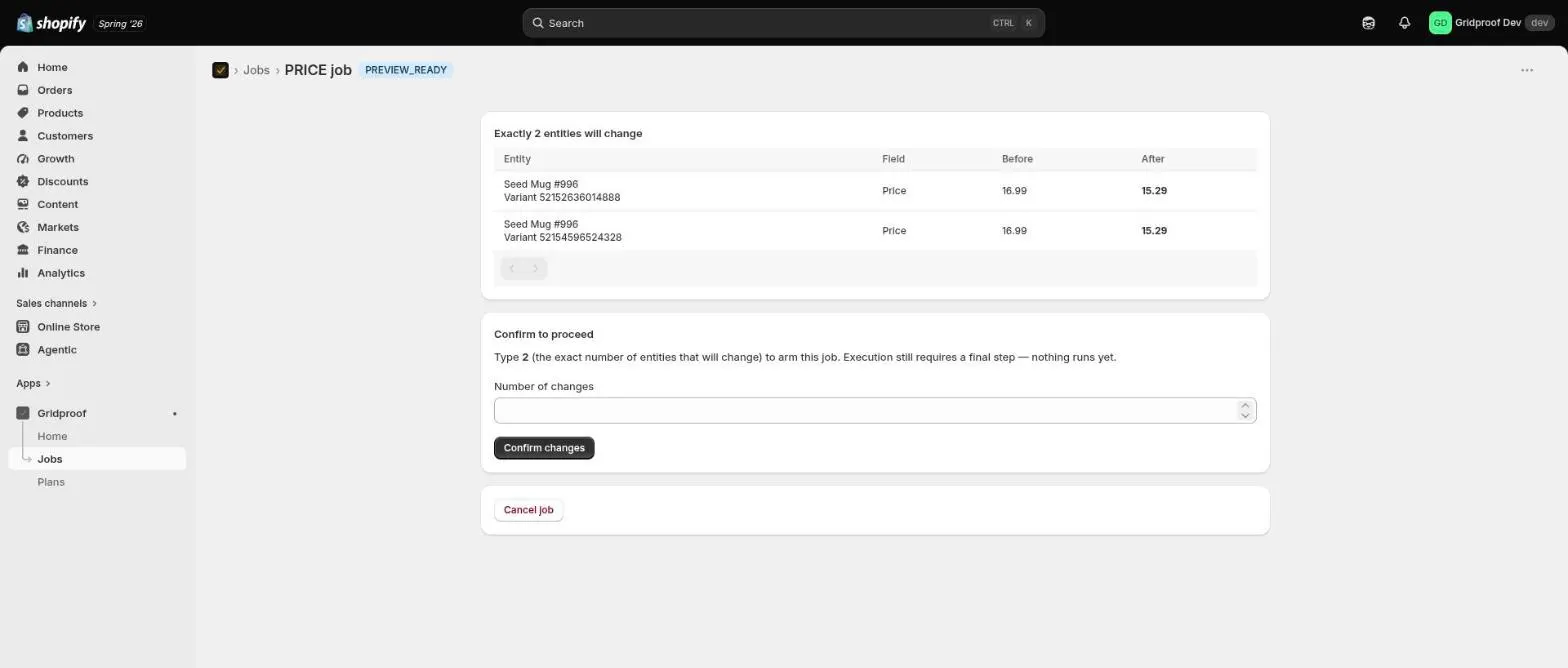
Three checks, in order:
- Is the count in the right order of magnitude? You usually have a rough expectation. 40 versus 4,000 is the failure this catches.
- Do you recognise the products? Names you didn't expect mean the filter is wrong. The fix is to cancel and re-aim, not to proceed carefully.
- Are the before values what you expect? This is the check people skip. If the current prices already look wrong, something else has already happened to this catalog, and your job is about to be built on top of it.
4. Time the customer-facing ones
Price and status changes are visible to shoppers the moment they land. Two consequences worth planning around:
- Run them when you can watch. Not at the end of the day, not right before a weekend. The verified receipt arrives in minutes; being present for it is what makes a rollback a five-minute event.
- Remember what else reads your catalog. Marketplace syncs, feeds, email tools and marketing automations may pick up a wrong value within minutes. Restoring Shopify does not un-send an email or retract a feed update, which is a much better argument for a careful preview than for a fast undo.
5. When something looks wrong, stop
This is the one habit worth more than all the others combined.
Do not run a second bulk job to fix the first one. It is the single most reliable way to turn a recoverable mistake into an unrecoverable one. The corrective job is written from a wrong mental model of what the catalog now contains, and it destroys the clean checkpoint you were about to restore from.
Do this instead:
- Open the job that did it. The receipt tells you exactly what changed and on what.
- Roll it back — that path exists precisely for this, and it's itself previewed and verified, so you'll see what the restore will do before it does it.
- Read the skipped rows. Anything edited since the original job is left alone. That list is usually the most interesting thing on the page: it's the work somebody else did in the meantime.
- Only then decide whether anything further is needed.
If the bad edit came from somewhere else entirely — the Shopify admin, a CSV import, a different app — no rollback can help, because the prior state was never captured. That situation has its own guide: triage and recovery, step by step.
6. Treat Force as a last resort
The rollback card offers a Force option that restores checkpoint values even where the catalog has changed since — overwriting whatever those newer edits were.
The honest use case is narrow: a second bad job landed on top of the first, and you want the catalog back at the checkpoint regardless of what happened in between. Outside that, every skipped row represents somebody's deliberate work, and the skip is the feature doing its job. Read the list before you tick the box.
7. Decide who runs jobs
Worth thirty seconds of policy in any store with more than one person in the admin:
- One person owns a job from start to receipt. Handing off between the preview and the confirmation is how the count stops being checked by anybody.
- Say out loud when a job is running. A colleague hand-editing products mid-job is exactly the drift that makes a later rollback partial.
- Keep the audit export with the decision. When a price change comes from a supplier email or a margin decision, the per-job audit CSV filed next to it turns "why is this priced like that" into a ten-second answer months later.
8. Know your window
Rollback lasts as long as your plan's snapshot retention — 7 days on Free, 30 on Standard, 90 on Premium. Two things follow from that:
- Verify the same day. Not because the job needs watching, but because a problem found inside the window is a rollback and a problem found outside it is a reconstruction.
- An upgrade extends the snapshots you already have, not only future ones — so a lapsed window is a genuine recovery route rather than a purchase for next time.
Detail in verification, rollback and the audit trail.
The short version
Rehearse on three products. Aim, then check the count. Read the before values, not just the after ones. Run customer-facing changes when you're around to watch. If something looks wrong, roll back — never patch forward. And keep the receipt, because the day you need it is the day you need it in a spreadsheet.
Before your next price change specifically, the pre-flight checklist is worth ten minutes.
See how Gridproof works